
What Is an AI Browser Extension?
AI browser extensions use artificial intelligence to automate tasks, enhance web browsing, and provide intelligent assistance directly within your browser. Examples include using AI for writing (for example, summarizing content or assisting with writing in browser-based applications), controlling the browser with natural language, and analyzing or transcribing web content.
Examples of AI browser extensions include:
- Writing and content assistance: Tools like Jasper Everywhere and Grammarly provide in-line writing suggestions, rephrasing options, and even AI-generated drafts directly within browser text fields.
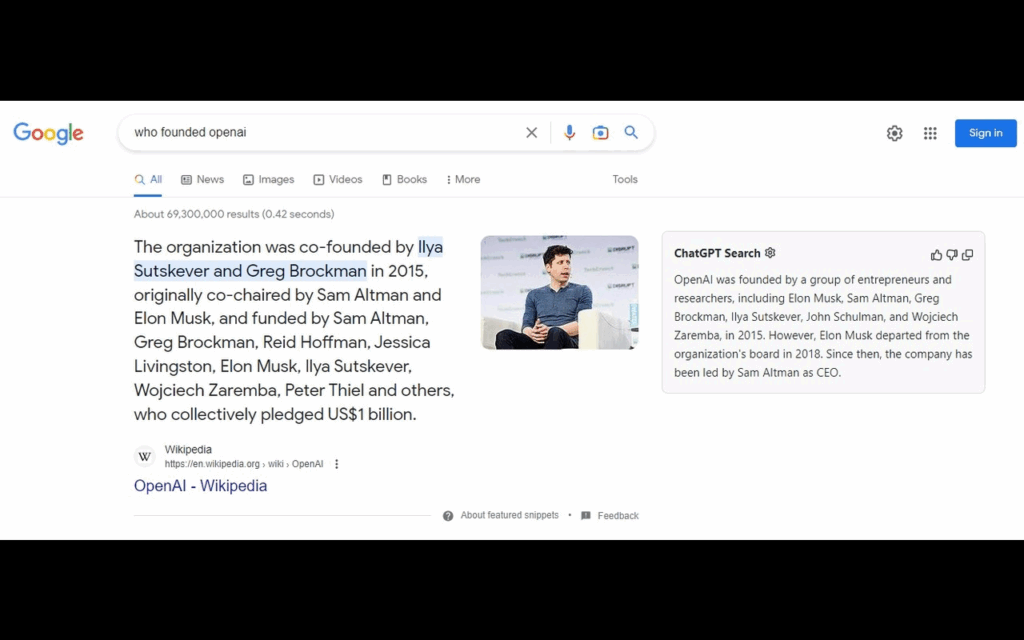
- Browser automation and control: AI extensions can use natural language commands or predefined logic to automate browser actions. For instance, ChatGPT for Google can interpret search intent and provide AI answers alongside traditional search results
- Contextual AI assistance: Some extensions, such as Perplexity AI Companion, provide an AI sidebar that can answer questions about the content of your open tabs without switching away.
- Content analysis and detection: Extensions like Monica use AI to analyze web pages and improve tasks like writing and coding.
- Summarization and organization tools: Extensions like Fireflies can summarize text, while GlaspWeb Highlighter helps simplify and organize information.
In this article:
- Main Capabilities and Functions of AI Browser Extensions
- AI Extensions vs. AI Browsers
- Pros and Cons of AI Browser Extensions
- Understanding the Security Risks of AI Browser Extensions
- Notable AI Browser Extensions
Main Capabilities and Functions of AI Browser Extensions
Writing and Content Assistance
AI browser extensions provide writing aid, offering capabilities such as grammar checks, style suggestions, and text summarization directly in text fields or web editors. Extensions often leverage large language models to auto-correct mistakes, recommend alternative phrasing, or provide template-based content generation suited to emails, blog posts, or online discussions.
Beyond grammar and syntax, writing assistance extensions can adapt to various tones, target audiences, or character limits based on user context, such as professional correspondence or social media posts. Some integrations offer language translation, rewriting for clarity or conciseness, and detecting potential bias or tone mismatches within the draft.
Browser Automation and Control
AI extensions increasingly contribute to automating web browsing routines, reducing repetitive manual tasks by interpreting user intent and executing pre-defined sequences. Automation capabilities include filling forms, auto-navigating multi-step workflows, scraping data, or batch-processing downloads and uploads based on content type or contextual triggers. This minimizes human input in tasks that are predictable or rule-driven.
These browser automation tools are particularly valuable for research, data collection, and administrative workflows where speed and precision are required. AI models used in extensions can adapt to page structure changes or unexpected prompts, handling dynamic web elements more flexibly than traditional scripts. They also offer simple visual interfaces or natural language command options for less technical users.
Contextual AI Assistance
Contextual AI assistance is a feature of modern AI browser extensions. These tools analyze the content displayed on webpages in real time, providing targeted recommendations, smart links, instant explanations, or summarizations relevant to the immediate user context. This could involve highlighting definitions, generating related research, or offering real-time answers drawn from search engines or curated databases.
The agility of contextual AI means that suggestions are tailored not only to the webpage but also to user goals, such as researching a topic, composing an email, or shopping online. By integrating context detection, these extensions can reduce distractions and present useful information proactively.
Content Analysis and Detection
AI browser extensions are adept at examining web content for various purposes, including identifying plagiarism, detecting sentiment, and flagging misinformation or potentially harmful content. This function is crucial for educators, researchers, and content creators, who need to verify originality, fact-check claims, or assess the tone of written materials.
Another common use is for privacy and compliance workflows, where extensions can monitor for sensitive or regulated data types within forms or documents. By integrating with machine learning models trained on large datasets, these extensions offer nuanced analysis, sometimes down to entity extraction or risk flagging.
PDF and Video Tools
AI browser extensions extend their utility to handling PDFs and videos, historically challenging content types in browsers. For PDFs, extensions can extract text, summarize documents, fill form fields, or annotate directly within the browser without specialized software. AI tech enables smart keyword search, contextual summarization, or translation in scanned, image-based PDF files.
For videos, AI extensions may generate real-time transcripts, auto-captioning, or offer summarization of lengthy content by identifying key topics and timestamps. These features improve accessibility, enabling users to review or repurpose video content more efficiently.
Task Management
Task management features in AI browser extensions offer ways to capture, organize, and automate to-dos directly from the sites users visit. By integrating with popular productivity platforms or providing standalone solutions, these extensions detect actionable items in emails or web content and convert them into reminders, calendar entries, or workflow tasks with minimal user intervention.
Natural language processing allows for context-aware extraction of deadlines, assignments, or follow-up actions. Advanced task management extensions may also monitor web activity and suggest productivity improvements, prompt regular check-ins, or assist with project tracking.
AI Extensions vs. AI Browsers
AI Extensions are modular add-ons that integrate with standard browsers like Chrome, Firefox, or Edge, bringing AI functionalities to an environment users are already familiar with. Users can selectively add or remove extensions based on specific needs, allowing for a tailored browser experience that augments, rather than replaces, the core browser capabilities.
AI browsers are purpose-built web browsers that bake AI features deeply into the browser’s architecture. Examples include browsers with integrated AI assistants for search, summarization, or workflow automation available by default on every page.
While AI browsers can offer a unified experience and sometimes better performance due to tight integration, they require users to adopt a new platform and may lack the extensibility or familiarity of traditional browser-extension combinations.
Pros and Cons of AI Browser Extensions
AI browser extensions offer a range of benefits by embedding intelligent tools directly into the browser, but they also introduce limitations depending on the implementation and use case. Below is a concise breakdown of their key advantages and drawbacks.
Pros:
- Integration: Operate directly within popular browsers, allowing users to access AI features without switching platforms.
- Customizability: Users can install only the extensions they need, creating a personalized set of tools for their workflow.
- Task automation: Simplify repetitive tasks such as form filling, summarizing content, or managing emails, saving time and effort.
- Context awareness: Provide real-time assistance based on the content of the page, improving relevance and user efficiency.
- Lightweight deployment: Requires no separate software installations; most are quick to install, update, and remove.
- Tool interoperability: Often work in conjunction with other productivity or note-taking tools, enhancing existing ecosystems.
Cons:
- Performance impact: Multiple or poorly optimized extensions can slow down browser performance and increase memory usage.
- Security risks: Some extensions may request broad permissions, posing risks if not properly vetted or updated.
- Data privacy concerns: Extensions that analyze web content may transmit sensitive data to external servers, raising privacy issues.
- Limited offline functionality: Many rely on cloud-based APIs or models, reducing effectiveness without internet access.
- Compatibility issues: May conflict with each other or with website elements, leading to UI bugs or malfunctioning features.
- Feature fragmentation: Users often need to install several extensions to cover all desired functions, leading to redundancy or inconsistency.
Understanding the Security Risks of AI Browser Extensions
AI browser extensions can boost productivity by summarizing pages, automating tasks, and interacting with websites on your behalf. But because they often require deep access to your browser and may send data to external AI services, they introduce unique security and privacy risks. Below is a clear breakdown of the major concerns.
- Excessive Permissions and Broad Data Access: Many AI extensions request permissions to read or modify data on every website you visit. They may access browsing history, cookies, page content, and form inputs. Broad, persistent access significantly increases the attack surface if the extension is compromised.
- Data Exfiltration and Unintended Sharing: AI extensions often upload webpage content to remote servers for processing. Sensitive data, such as personal, financial, or company-confidential data, can be unintentionally transmitted. Collected data may be used for analytics, behavioral profiling, or shared with third parties.
- Malicious or Compromised Updates: An extension that starts out safe can become dangerous if a developer account is hacked or sold. Malicious code can be pushed through routine updates without the user realizing. Browser store reviews and vetting are not sufficient to guarantee long-term safety.
- Agentic Behavior and Unintended Actions: AI agents that can click, navigate, and fill forms act with high privileges. Prompt-injection or malicious webpage instructions can cause the agent to perform harmful actions. Automated behavior can accidentally leak data, submit forms, or follow unsafe links.
- Backend and Supply-Chain Vulnerabilities: Most AI extensions rely on cloud APIs, meaning the backend is part of the security chain. A breach in the extension’s server infrastructure compromises all user data sent to it. Poorly secured servers or third-party integrations increase supply-chain risk.
- Privacy, Compliance, and Regulatory Exposure: Uploading user content to external AI systems can violate data-protection rules (GDPR, HIPAA, etc.). Organizations risk exposing internal or proprietary information through unmanaged extensions. Lack of transparency about how data is stored or processed complicates compliance.
Related content: Read our guide to browser security
Notable AI Browser Extensions
1. ChatGPT for Google
ChatGPT for Google is a browser extension that enhances traditional search engine results by embedding AI-generated answers directly alongside them. Instead of browsing through multiple links, users get concise, AI-summarized insights at the top of the results page. The extension supports Google, Bing, DuckDuckGo, and other popular search engines, making AI assistance accessible within the search interface itself.
Key features include:
- AI answers next to search results: Displays responses from AI models (e.g., ChatGPT, Bard, Claude) next to standard search results for faster, clearer insights.
- Multi-engine support: Works across Google, Bing, DuckDuckGo, and more.
- Answer comparison: Shows outputs from multiple AI models on the same page for easy evaluation.
- Search agent mode: Uses multiple keyword variations to find and deliver the most accurate answers.
- Quick question mode: Type “gpt” in the browser bar, then hit Tab or Space to enter a direct question.
2. Perplexity AI Companion

Perplexity AI Companion is a browser extension that combines the AI responses with contextual web browsing. Instead of switching between search engines and chatbots, users can ask questions, get summaries, and explore follow-up queries without leaving the current page. By understanding the content of the site, the extension delivers relevant answers.
Key features include:
- Instant page summaries: Quickly understand articles or webpages with AI-generated summaries presented directly in the browser.
- Quick queries from toolbar: Ask questions at any time using the extension’s toolbar interface, without opening a new tab.
- Context-aware responses: Get answers based on the content of the page being viewed or specific to the website’s domain.
- Follow-up questions: Keep the conversation going with follow-up queries that build on previous answers for deeper clarity.
- Shareable results: Easily generate and share links to AI-assisted insights with others.
3. Fireflies

Fireflies is a browser extension to simplify Google Meet workflows by automatically recording, transcribing, and summarizing meetings without requiring a bot to join. It allows users to focus on the conversation while Fireflies handles note-taking, speaker tracking, and action item creation.
Key features include:
- Live transcription: Get real-time, high-accuracy transcripts during Google Meet calls without needing a meeting bot.
- Auto speaker identification: Distinguish between participants with automatic speaker labels in the transcript.
- Meeting summaries: Receive instant AI-generated summaries with action items, bullet points, and key takeaways.
- AskFred AI assistant: Ask contextual questions during the call to clarify points or retrieve specific information from the conversation.
- Auto language detection: Seamlessly detect and transcribe meetings across multiple languages without manual setup.

4. Jasper

The Jasper Everywhere Extension brings AI writing capabilities directly into the browser, enabling users to create, edit, and improve content across any website. Designed for marketers, creators, and teams, this extension lets users write smarter and faster without switching tools or tabs.
Key features include:
- Write anywhere online: Use Jasper directly inside web apps, content fields, and platforms like Google Docs, Facebook, LinkedIn, Shopify, and more.
- 100+ purpose-built AI apps: Access a range of content tools including blog post writers, ad generators, SEO tools, product descriptions, captions, and email sequences.
- Instant content generation: Produce headlines, paragraphs, or full drafts in seconds with natural-sounding AI output.
- Multilingual writing: Create content in over 80 languages to support global audiences and diverse marketing campaigns.
- Content transformation tools: Expand, shorten, rephrase, or adjust tone (e.g., witty, empathetic, or celebrity-inspired styles) with one click.

5. Glasp Web Highlighter

Glasp Web Highlighter is a browser extension that lets users highlight, annotate, and organize content directly from webpages, PDFs, and YouTube videos. It transforms reading and research into a personalized knowledge base by saving highlights, notes, and insights in one place.
Key features include:
- Web and PDF highlighting: Highlight text directly on websites or PDF files in Chrome and Safari; annotate with personal notes while reading.
- YouTube video highlights: Mark timestamps, add notes, and create shareable highlights from YouTube videos for easy reference.
- Chat with your highlights: Interact with saved highlights and notes using AI-powered chat to get personalized insights and contextual answers.
- Import from other platforms: Bring in highlights from Kindle, Pocket, Medium, Readwise, Snipd, and more to consolidate all knowledge in one place.
- Organize and search notes: Use tags and author filters to organize content and retrieve ideas quickly when needed.

6. Monica

Monica is an AI assistant that brings together multiple language and multimodal models, including GPT-5, Claude 4.5, and Gemini 2.5, into a single browser extension. It helps improve everything from writing and research to coding, video summarization, and strategic analysis.
Key features include:
- Unified AI chat hub: Access leading AI models (GPT-5, Claude 4.5 Sonnet, Gemini 2.5, Sora 2, DeepSeek V3.1, and others) in a single interface.
- AI sidebar: Open a compact sidebar from any webpage to chat, ask questions, or access AI tools without switching tabs.
- Smart toolbar actions: Instantly summarize, translate, or explain selected text anywhere online with a single click.
- Writing assistant: Draft, rewrite, or refine content directly in web input fields, from emails to blog posts.
- YouTube summarization: Summarize videos with key takeaways and timestamps for faster content digestion.

7. Speechify

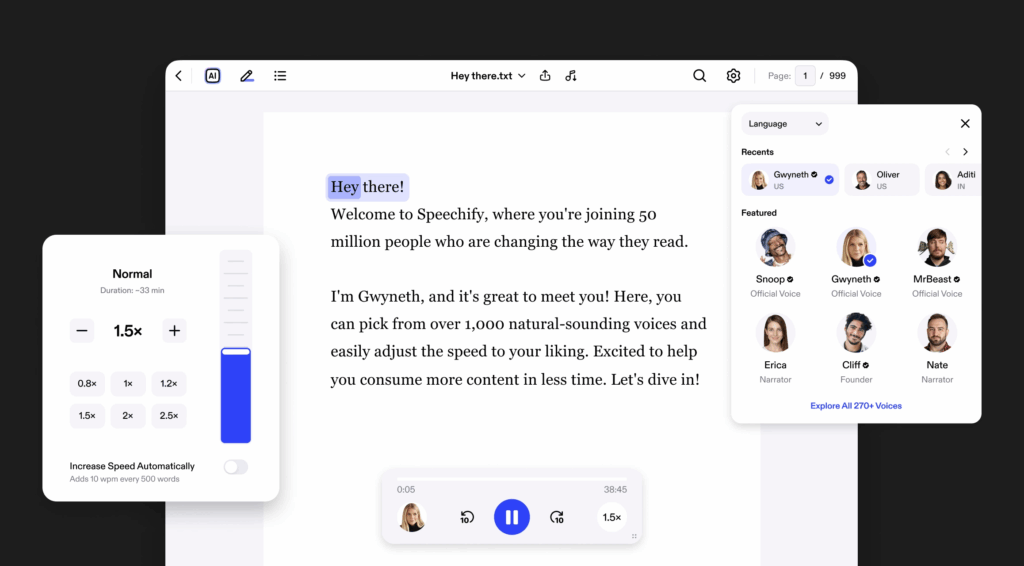
Speechify is a text-to-speech Chrome extension that lets users listen to articles, emails, Google Docs, and PDFs in the browser. Intended for users who want to save time, reduce screen fatigue, or absorb content while multitasking, Speechify turns written text into natural-sounding audio using lifelike AI voices.
Key features include:
- Listen to any text: Convert Google Docs, emails, articles, and web pages into speech instantly.
- 200+ lifelike voices: Choose from a range of natural-sounding voices, including celebrity voices and multilingual options.
- Speed control: Customize playback speed up to 4x for faster listening without losing clarity.
- Text highlighting: Follow along as text is read aloud, with real-time word highlighting to improve comprehension and focus.
- Floating side player: A non-intrusive mini-player auto-appears when text is detected, so users can listen without leaving the current tab.
8. Grammarly

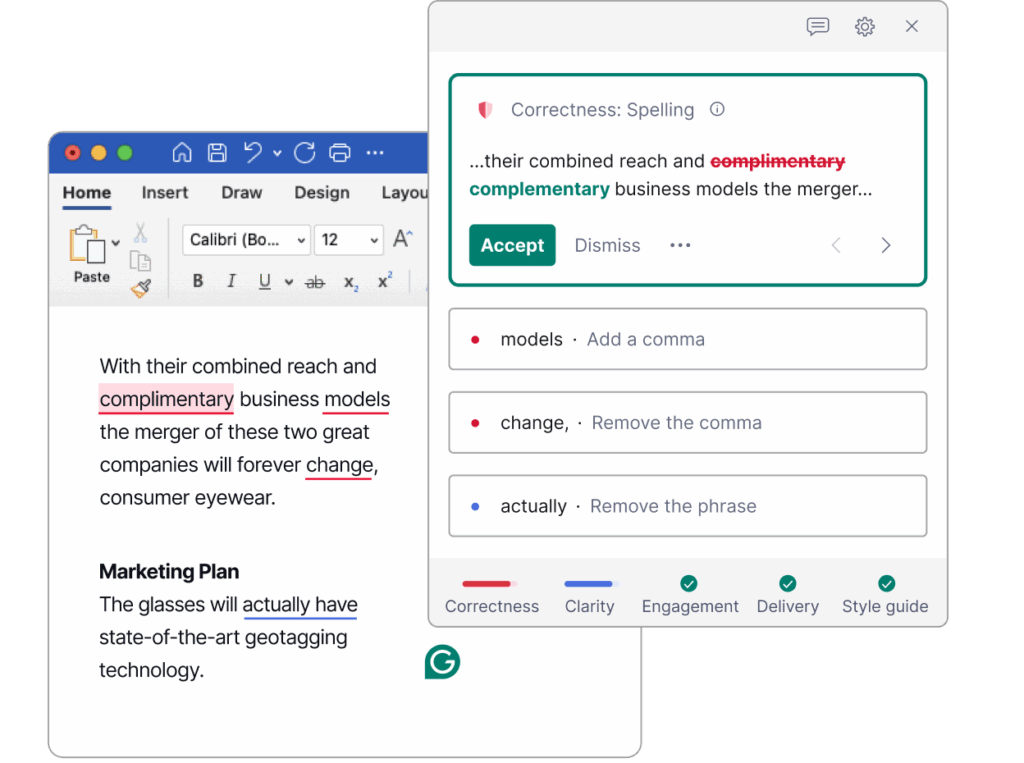
The Grammarly Chrome Extension brings AI writing assistance directly into the browser, helping users write clearly, confidently, and correctly across the web. Whether composing an email, drafting a LinkedIn post, or polishing a document in Google Docs, Grammarly provides real-time suggestions to improve grammar, clarity, tone, and style.
Key features include:
- Works across the web: Provides writing support in over a million apps and websites, including Gmail, Google Docs, LinkedIn, Facebook, X, Instagram, Salesforce, and Medium.
- Generative AI writing: Instantly create drafts, rephrase sentences, and generate email replies with context-aware suggestions.
- Grammar and spell check: Automatically detects and corrects grammar, punctuation, spelling, and commonly confused words.
- Tone detection: Analyzes tone and helps adjust it to match intent, whether formal, friendly, or persuasive.
- Clarity and conciseness: Refines writing by eliminating redundant phrases and simplifying complex sentences.
Securing AI Browser Extensions with Seraphic
AI browser extensions are evolving fast, and Seraphic is built to secure them at the speed of that innovation. Seraphic delivers protection directly at the browser layer, giving enterprises full visibility and precise control over every AI extension without requiring any modification, wrapping, or custom integration. Its lightweight architecture enforces granular, context-aware policies that govern what extensions can access, capture, or execute, ensuring sensitive data stays protected even as users adopt new AI tools.
Seraphic’s real-time threat prevention continuously inspects extension behavior, instantly blocking actions that violate security, compliance, or data governance rules. Because Seraphic works consistently across all browsers, devices, and operating systems, organizations can confidently roll out AI extensions at scale without sacrificing oversight. With Seraphic, enterprises get the rare combination of strong, deterministic control and seamless user experience, which enables secure, accelerated adoption of AI-driven productivity tools across the entire workforce.
About the Author