
What AI Features Does the Brave Browser Offer?
Brave is a privacy-focused web browser built on Chromium, the same foundation as Chrome. It blocks ads and trackers by default, which improves page load speed and protects user data. It also upgrades connections to HTTPS automatically, helping secure web traffic.
Brave integrates two main AI features: Ask Brave and Brave Leo.
- Ask Brave is built into Brave Search. It uses AI to generate answers directly in the search results page by synthesizing information from across the web. It supports a range of topics, including news, sports, and coding, and always cites sources. It’s fast, private, and works without tracking.
- Brave Leo is the browser’s built-in AI assistant. It can summarize web pages, translate content, analyze documents, and generate new material. Users can chat with Leo about what they’re reading or watching. Leo works across various content types like PDFs, images, and Google Docs, and it doesn’t store conversations or require accounts.
Both features run on desktop and mobile, and all AI functions are optional, giving users control over their experience.
This is part of a series of articles about AI browser
In this article:
- Getting Started with Brave AI
- Brave AI Review: Pros and Cons
- Brave AI Security Risks to Watch Out For
Getting Started with Brave AI
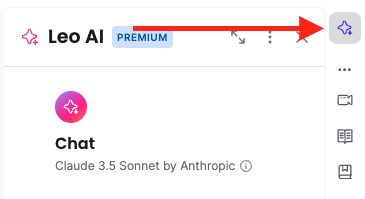
Brave Leo is built directly into the Brave browser, so no extra downloads or extensions are needed. To start using it, users must opt in during their first interaction. Until that point, Leo remains inactive and doesn’t process any data. Once enabled, you can access Leo through the address bar by selecting Ask Leo after typing a query, or by clicking the Leo icon in the sidebar.

Leo opens in a chat interface, where users can enter prompts to summarize content, generate ideas, translate text, or ask questions. A full-page chat experience is also available by visiting brave://leo-ai, selecting Ask Leo from address bar suggestions, or expanding a sidebar chat. Users can switch between different AI models depending on their needs using the model selection menu at the top of the chat window.
All interactions with Leo prioritize privacy. Conversations are not logged, stored, or used for model training. Chat history stays on your device and can be deleted or disabled entirely in settings. No Brave account is required to use Leo, and even Leo Premium subscriptions are unlinkable from user activity. This ensures a private and secure AI experience.
Brave AI Review: Pros and Cons
Brave Leo delivers on privacy but stumbles when it comes to reliability. Here’s a breakdown of what works and what doesn’t.
Pros
- Built-in and easy to use: Leo is integrated directly into the Brave browser, so there’s no need for extra installations or accounts. It runs on desktop and mobile and opens in a sidebar, making it accessible without interrupting browsing.
- Strong privacy protections: Leo’s privacy-first approach is a standout feature. It doesn’t log conversations, store data, or use chats for training. Requests are routed through anonymous servers, and users don’t need to sign in, even for the premium version.
- Broad functionality: Leo can summarize long articles, translate content, assist with emails or code, and handle documents from sources like Google Drive. It also answers general questions, acting as a browsing companion for quick tasks.
- Multiple AI models: Users can switch between different large language models (LLMs), including Mixtral, Llama 2, and Claude. This flexibility allows for different strengths depending on the task.
Cons
- Limited accuracy: The most consistent complaint is Leo’s tendency to generate incorrect or fabricated information. Because it’s not connected to live internet data, it often delivers outdated or entirely fictional responses, even when asked simple factual questions.
- Summarization limits: While summarizing is a core feature, Leo frequently struggles with long documents, sometimes returning errors like “this page was too long for Leo.”
- Not suited for business use: Due to hallucinations and data gaps, Leo isn’t reliable for professional environments. Misleading outputs, such as fabricated reviews or financial information, pose risks that make it unsuitable for customer-facing or internal business tasks.
- No real-time knowledge: Leo’s models operate on pre-existing training data and aren’t updated in real time. Users looking for current news or recent developments will need to use other tools or rely on Brave Search instead.
Brave AI Security Risks to Watch Out For
AI browser agents offer to automate web interactions for users, but they introduce serious security concerns that go beyond traditional browser risks:
- Access issues: These agents often require broad permissions to function, including access to emails, calendars, and contacts. While this can make them useful for basic tasks, it also expands the attack surface. The more access these agents have, the more damage can be done if they’re compromised.
- Prompt injection attacks: This happens when a malicious actor hides harmful instructions in a web page, which the AI agent unknowingly interprets and executes. Because AI agents are designed to follow text-based instructions, even subtle or hidden cues can be enough to trigger unintended actions, like sending emails, posting on social media, or leaking personal data.
Security researchers point out that current AI models struggle to reliably distinguish between safe and harmful prompts. This makes it difficult to fully prevent prompt injection attacks. Even companies like OpenAI and Perplexity, which have implemented safeguards such as “logged out” browsing modes and real-time attack detection, admit the problem isn’t solved.
Brave researchers have called this a systemic challenge affecting the entire category of AI browsers. They warn that having a browser act on your behalf fundamentally changes the security model and increases the risk to user data.
Experts recommend that users be cautious with early-stage AI agents. Limiting their access to sensitive data, using strong passwords, and enabling multi-factor authentication can help reduce risk. But for now, AI browser agents remain vulnerable, and their growing use means these risks will only become more significant.
AI Browser Security with Seraphic
Seraphic turns any AI browser into a secure enterprise browser by enforcing real-time controls directly inside the browser engine, rather than relying on network or extension-based defenses. This lets security teams safely embrace AI-native and agentic browsers without sacrificing visibility, data protection, or user experience.
Native AI browser protection
Seraphic embeds a lightweight agent inside the JavaScript engine, intercepting scripts and AI-driven actions in real time to block zero-day exploits, in-browser phishing, and credential theft at the execution layer. This architecture allows Seraphic to secure AI browsers like Atlas, Comet, Brave AI, and others, as well as Electron-based apps such as ChatGPT desktop.
Data loss and prompt protection
Seraphic applies inline DLP and AI-aware policies to what users can type, paste, upload, or download, preventing sensitive data from being exposed to AI tools or leaked via AI-generated flows. Security teams can define granular rules for which AI tools are allowed, what data they can access, and how sensitive content is masked, watermarked, or blocked in real time.
AI visibility and governance
A dedicated GenAI dashboard provides full visibility into prompts, uploads, downloads, and agentic behavior across AI browsers and assistants, including shadow AI discovery.
Audit-grade logs and session-level telemetry turn AI oversight from reactive to proactive, supporting compliance investigations and ongoing tuning of AI usage policies.
Managed and unmanaged devices
Because protection is enforced in the browser itself, Seraphic secures AI-driven browsing on both managed and unmanaged endpoints without requiring VPN, VDI, or changes to existing network infrastructure. This “follow-the-user” model ensures consistent security controls and user experience across any browser, any device, and any AI-powered web or Electron application.
About the Author